Is ChatGPT on Viber Good?

TL;DR: ChatGPT on Viber is excellent for quick AI conversations, message drafting, translations, and brainstorming. However, it doesn’t replace your main ChatGPT account because it doesn’t inherit your long-term conversation history, memories, or projects.
Table of Contents
What is it like using GPT on Viber?

Published: July 2026
When ChatGPT on Viber suddenly appeared inside my Viber app, my first reaction wasn’t excitement.
It was curiosity.
Not because another app had added AI, but because I already use ChatGPT extensively every day. If OpenAI was now inside one of the world’s largest messaging apps, I wanted to know one thing:
Is this actually useful, or is it just another AI feature nobody asked for?
Instead of asking it to write poems or recipes, I decided to interrogate it.
This is what I found.
First Impressions
The integration feels surprisingly polished. Like any ChatGPT initial prompt would before thorough testing
Click here for the brief: AI on Viber – Viber Support
Instead of downloading another application, ChatGPT on Viber simply appears as another contact inside Viber.
You can immediately begin chatting with it.
No complicated setup.
No plugins.
No API keys.
That’s great for casual users.
But I wanted to know something deeper.
| Feature | ChatGPT App | ChatGPT on Viber |
|---|---|---|
| Conversation History | ✅ | Current chat only |
| Saved Memory | ✅ | ❌ |
| Projects | ✅ | ❌ |
| Quick Messaging | ❌ | ✅ |
| Translate Messages | ✅ | ✅ |
| Best For | Deep work | Quick chats |
My first message wasn’t:
“Hello.”
Instead it was:
“Are you accessing my current ChatGPT account or is this a stateless instance inside Viber?”
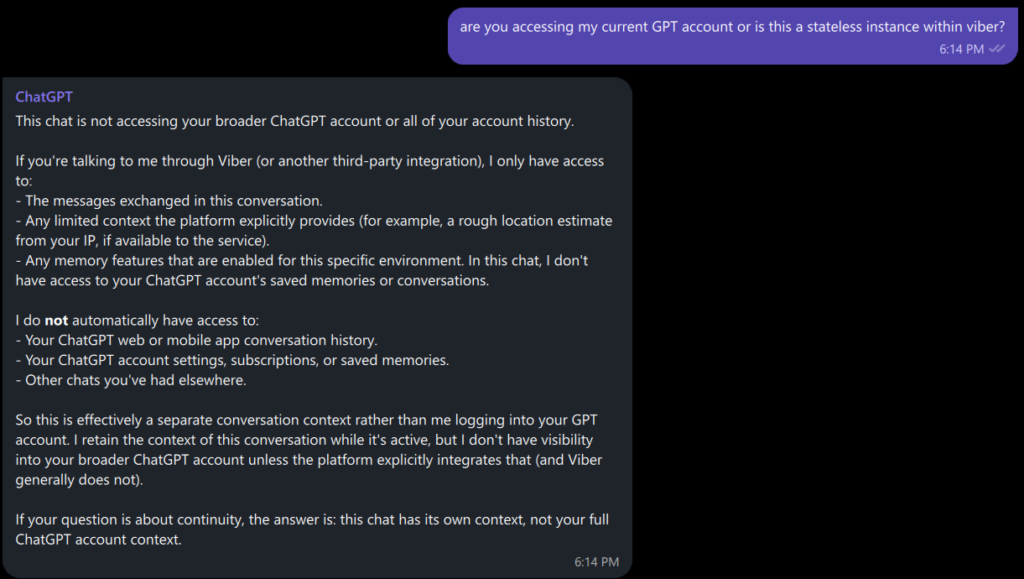
The answer was interesting.
ChatGPT on Viber explained that it does not automatically inherit your existing ChatGPT history, Memories, Projects, or archived conversations.
Instead, it behaves as an independent conversation unless you explicitly connect your ChatGPT account where supported. Even then, the experience is still governed by the Viber integration rather than becoming a full replacement for the ChatGPT app. :contentReference[oaicite:0]{index=0}
That immediately answered one of my biggest questions.
Can It Read My Viber Chats?
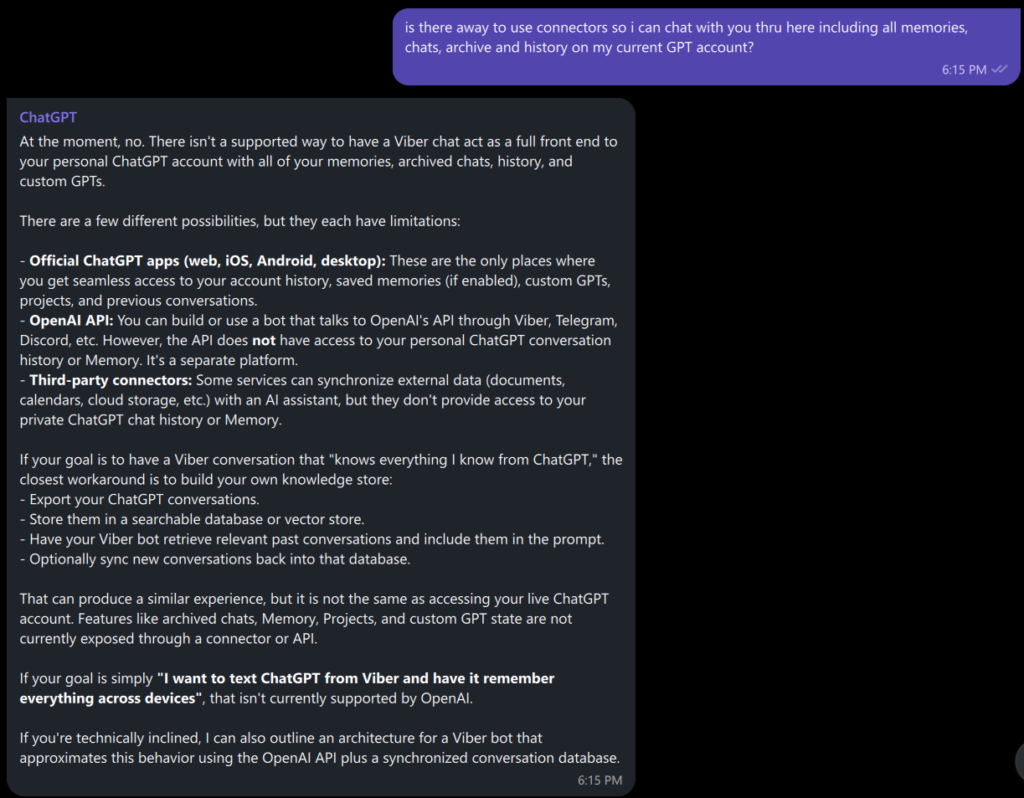
No. ChatGPT on Viber cannot, nor can it access your primary account, history, archives or memory
I asked whether it could summarize my recent conversation with someone in my contacts.
The answer was exactly what I hoped it would be.
It cannot.
It only sees messages that you intentionally send to it.
It cannot browse your Viber conversations, your contacts, or your private chats.
From a privacy standpoint where my own messages are put at risk of being read by a company, that’s reassuring.
Can It Replace ChatGPT?
For me?
Not really.
My main ChatGPT account contains years of conversations, ongoing projects, saved memories, technical discussions, business planning, and research.
The ChatGPT on Viber version starts with none of that.
It doesn’t know who I am.
It doesn’t know what I’m working on.
It doesn’t know the conversations we’ve already had.
If you’re someone who has built a long-term workflow around ChatGPT, you’ll immediately notice that difference.
Where It Actually Shines
That doesn’t mean it’s useless.
After thinking about it, I realized Viber ChatGPT is best viewed as a satellite terminal rather than your primary workspace.
It’s excellent for:
- Quick questions
- Translation
- Drafting replies
- Brainstorming
- Explaining something while you’re already chatting
- Summarizing links
- Catching up on busy group chats
- Polishing messages before sending them
Viber has also integrated ChatGPT into several messaging features beyond the standalone chat, including AI message polish, chat summaries, link summaries, translations, image remixing, and @ChatGPT mentions in supported chats. Availability depends on your region and app version. :contentReference[oaicite:1]{index=1}
Those features make much more sense than simply adding “another chatbot.”
ChatGPT on Viber Limitations
For power users, the limitations become obvious very quickly.
You cannot expect it to:
- Remember years of previous conversations
- Access your archived ChatGPT chats
- Browse your Viber messages
- Understand your ongoing projects automatically
- Function as your complete second brain
That isn’t a bug.
It’s simply how the integration is designed.
What the Internet Thinks
Community reactions have been… mixed.
Many users appreciate having AI directly inside Viber, especially for summarizing conversations, translating messages, and answering quick questions.
Others are frustrated that AI appears in yet another messaging application and wish the feature were easier to hide or disable. Reddit discussions over the past week reflect both perspectives. :contentReference[oaicite:2]{index=2}
That split isn’t surprising.
Whether ChatGPT on Viber feels useful depends heavily on how you already use AI.
My Verdict
⭐⭐⭐⭐☆ (4/5) for casual users
⭐⭐☆ (2/5) for heavy ChatGPT users
If you’ve never used ChatGPT before, Viber is actually a fantastic place to start.
It’s convenient.
It’s fast.
It’s already inside an app you probably use every day.
But if you’ve spent years building context, memories, and projects inside ChatGPT itself, you’ll quickly discover that this isn’t a replacement.
It’s a companion.
Think of it as carrying a pocket notebook rather than moving your entire office into Viber.
For quick questions, it’s excellent.
For long-term collaboration, your primary ChatGPT workspace still wins.
Final Thoughts
As someone who already uses ChatGPT daily, I initially expected Viber to become another doorway into my existing AI workspace. Instead, I found something different. ChatGPT on Viber isn’t trying to replace the main app. It’s a lightweight companion that’s always one message away. Whether that’s enough depends entirely on how you already use AI.
After spending an hour trying to “break” ChatGPT on Viber, I came away with a surprisingly positive impression.
Not because it replaced ChatGPT.
Because it never pretended to.
It knows exactly what it is.
A fast, lightweight AI companion living inside one of the world’s biggest messaging platforms.
And honestly…
that’s probably exactly what it should be.
Final WhisperTechAI Rating
| Category | Score |
|---|---|
| Ease of Use | ⭐⭐⭐⭐⭐ |
| Features | ⭐⭐⭐⭐☆ |
| Privacy | ⭐⭐⭐⭐⭐ |
| Productivity | ⭐⭐⭐☆☆ |
| Long-Term Memory | ⭐☆☆☆☆ |
| Overall | 8.2/10 |
Recommended for: Casual AI users, messaging-first users, travelers, students.
Not recommended for: Users who rely on ChatGPT Projects, Memory, or long-running conversations.
Last updated: July 14, 2026. This review will be updated as Viber rolls out new ChatGPT features and account integrations.
For More Tech and Ai check out my other posts: https://whispertechai.com/