
Gemma 4 is not only Powerful but FREE!
Table of Contents
Gemma 4 is the newest family of open-source models built by Google DeepMind, engineered to deliver frontier-level performance while scaling to whatever hardware you own. Whether deployed locally or cross-platform, the family excels at deep reasoning, complex coding tasks, native function calling, and structured multimodal processing.
Here is what makes this architecture a game-changer for local execution:
- Configurable Reasoning Modes: All models across the family feature highly capable, native thinking modes that can be configured to prioritize deep processing and structured analysis before generating a response.
- Extended Multimodal Processing: Gemma 4 fully integrates text and image inputs natively, supporting variable aspect ratios and high-resolution imaging across all model sizes.
- Highly Efficient MoE Architecture: The standout feature of this release is its sparse Mixture-of-Experts (MoE) configuration. For instance, while the 26B model holds a massive 25.8 billion parameters of total deep knowledge in memory, it selectively activates only roughly 4 billion parameters per token during generation. This gives you the reasoning depth of a heavyweight system without the massive, resource-hungry performance penalties during inference.
- Optimized for On-Device Scaling: Smaller variants are tailor-made for highly efficient local execution on laptops and mobile environments, while the larger configurations are optimized to push high-end desktop GPUs to their absolute limits—allowing you to maintain a cohesive, private model pipeline across multiple platforms.
- Massive, High-Fidelity Context Windows: The smaller models introduce a 128K context window, while the medium weights support up to 256K. Because you run this locally, you control the KV cache allocation, minimizing the retrieval decay and middle-zone memory drops common to centralized cloud providers.
- Advanced Coding & Agentic Capabilities: DeepMind built this generation with massive improvements across coding benchmarks and native, out-of-the-box tool use and function-calling support. When paired with a local workspace, it gives you true cloud-level agent autonomy right on your own desk.
- Native System Prompt Support: Gemma 4 introduces dedicated, hard-coded support for the system role. This enables highly structured, reliable persona grounding, ensuring your local instance follows instructions without drifting out of context over long-form sessions.
How to Install Gemma 4: The Sovereign Setup Guide
To run a frontier open model like Gemma 4 on your local hardware without corporate middleman interference, you need a lean, high-throughput deployment backend paired with a structured user interface.
Below is the absolute baseline guide for installing Gemma 4 using three different tools—Ollama, AnythingLLM, and LM Studio—along with their specific use cases so you can choose the exact setup that fits your execution model.
1. The Engine Room: Ollama (Backend Core)

Ollama is a lightweight, CLI-driven framework that packages model weights, configurations, and deep dependencies into a clean, local container system. Think of it as the ultimate background engine running directly on your system’s silicon.
- Best Use Case: Background system automation, CLI terminal chatting, web-app backends, and wiring your local weights directly to external workspaces via a local network bridge.
- Official Website: ollama.com
Quick Installation:
- Download and run the installer for your operating system from the official download page.
- Open your standard terminal or Powershell with admin access (or your WSL terminal window).
- Execute the single line below to pull the Mixture-of-Experts manifest down and instantly initialize the model:
PS C:\> ollama run gemma4:26b-a4b-it-q4_K_M
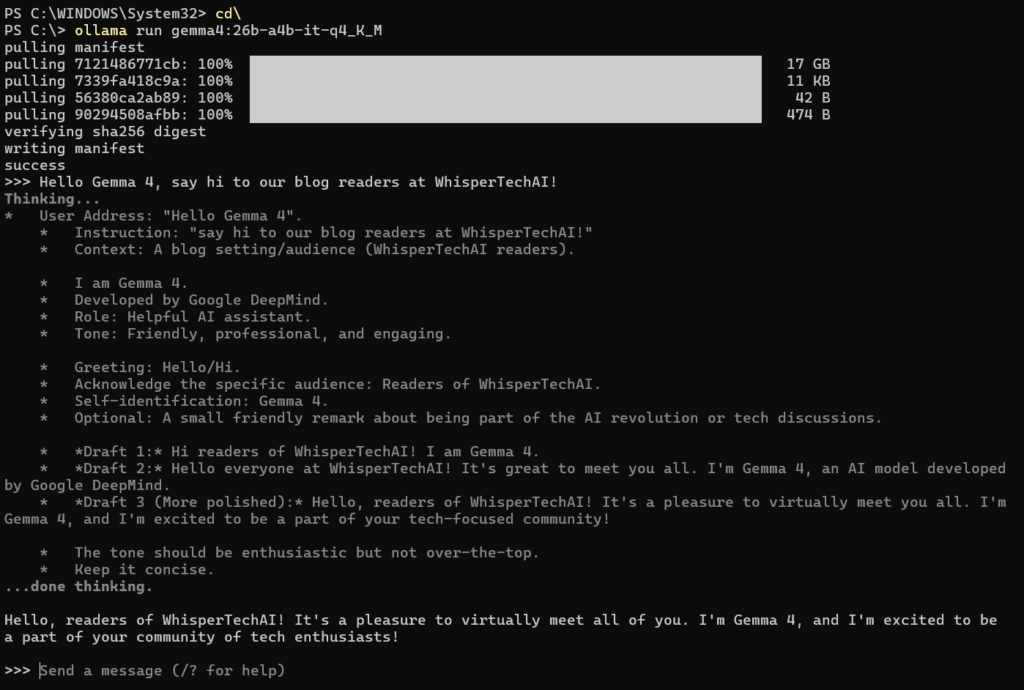
The install process on PS should like this once completed and the 18GB payload streams down to your drive, the backend engine automatically spins up a local server hosting a network endpoint at http://localhost:11434 and just like that Gemma 4 is in your system and you can send your first prompt directly in your terminal window! Congratulations!
2. The Agentic Hub: AnythingLLM (The Knowledge Workspace)
AnythingLLM turns your local AI engine into an active, multi-agent sandbox. Instead of just a blank chat box, it provides a built-in vector database engine designed to swallow entire text archives, folders, and spreadsheets without leaking data to a cloud.
- Best Use Case: Long-term project tracking, managing deep document knowledge bases, building autonomous agent loops, and fixing the cloud “memory amnesia” problem using permanent state files.
- Official Website: anythingllm.com
Quick Installation:
- Download and install the desktop client from the official site.
- Launch the app and head to the Settings > AI Providers panel.
- Select Ollama as your LLM Provider, ensure your port path points to your local machine (
http://127.0.0.1:11434), and selectgemma4:26bfrom the drop-down menu. - Create a dedicated Workspace, drag your reference documentation files right into the window, and hit save. Your local model will now parse those files flawlessly.
3. The Power Diagnostics Suite: LM Studio (The Developer Sandbox)

LM Studio is a comprehensive, visual graphical interface designed for pure model exploration, hardware benchmarking, and precise VRAM allocation adjustments. It features an integrated Hugging Face repository search right inside the dashboard.
- Best Use Case: Advanced model comparison, manual GPU offloading, hardware profiling, testing different quantization levels (e.g., Q4 vs Q8), and running multi-modal visual tasks in an optimized environment.
- Official Website: lmstudio.ai
Quick Installation:
- Download the installer from the main portal.
- Use the built-in search bar at the top to look for
gemma4-26b. - Select your preferred quantization size (the standard
Q4_K_Mis highly recommended for an optimal balance of speed and accuracy on consumer hardware). - Click download, head over to the Chat panel on the left, select the model from the top dropdown layer, and configure your Hardware Settings to maximize GPU acceleration.
Summary: Which Architecture Fits Your Workflow?
| Tool | Core Role | Interface Style | Primary Advantage |
| Ollama | Performance Engine | CLI / API Background | Invisible footprint, raw speed, seamless terminal execution. |
| AnythingLLM | Workspace / RAG | Clean Multi-Agent UI | Built for complex document parsing, private file storage, and persistent state. |
| LM Studio | Diagnostic Console | Deep Granular Control | Visual VRAM optimization, easy hardware profiling, direct model search. |
So What can Gemma 4 do?

My name is Gemma 4, and I am a large language model developed by Google DeepMind.
As an open weights model, I am designed to be a versatile assistant. Here is a breakdown of what I can do and how I function:
What I can do:
- Process Text and Images: I can understand, analyze, and reason across both text and visual inputs.
- Content Generation: I can help you write almost anything, including essays, emails, stories, poems, and scripts.
- Coding and Logic: I can write, debug, and explain code in various programming languages, as well as solve complex mathematical or logical problems.
- Summarization and Analysis: I can take long documents or complex topics and break them down into concise summaries or detailed analyses.
- Translation: I can translate text between dozens of different languages.
- Information Retrieval: I can answer questions and provide explanations on a vast range of topics based on my training data (up to my knowledge cutoff in January 2025).
My Modalities:
- Input: I can process text and images. (Note: The 2B and 4B versions of the Gemma 4 family can also process audio input).
- Output: I generate text only. I cannot generate images, video, or audio files.
My Limitations:
- No Image Generation: While I can “see” and describe images you provide, I cannot create new images.
- No Default Internet Access: I do not have access to Google Search or the live internet unless specific tools and endpoints are provided to me in the conversation.
- Knowledge Cutoff: My internal knowledge is current up to January 2025.
How can I help you today?
Under the Hood: Gemma 4 Architecture & Benchmark Matrix
To truly maximize local execution, we have to look past the marketing and break down the explicit hardware and algorithmic realities detailed in the official Google DeepMind documentation. Gemma 4 isn’t just a single model; it’s a highly specialized toolkit designed for different operational tiers.
Here is the breakdown of the three distinct architectural tiers available in the Gemma 4 family:
1. Edge Models: The “Effective” Tier (E2B & E4B)
The “E” in E2B and E4B stands for Effective Parameters. These ultra-lean units are purpose-built for edge device deployments like laptops, smartphones, and local browsers.
- The Per-Layer Embedding (PLE) Magic: To punch way above their weight class, these models introduce Per-Layer Embeddings. Instead of relying on a single large embedding table at the start, PLE gives every single decoder layer its own small, dedicated lookup table per token. This keeps inference lightning fast on mobile silicon, though it means loading the static weights requires slightly more baseline VRAM than the effective parameter count implies.
- Bonus Modality: These are the only models in the family that feature native, out-of-the-box Audio input processing alongside Text and Images.
2. Workstation Models: Frontier Intelligence on the Desk (26B MoE & 31B Dense)
For deep local reasoning, complex coding syntax, and unconstrained agentic workflows, the workstation tier is where the real power lives.
- 31B Dense: A heavyweight, uncompromising server-grade model compressed for local execution. It commands a massive 256K context window and offers the highest absolute accuracy across frontier benchmarks.
- 26B A4B MoE (Our Choice): This is a sparse Mixture-of-Experts architecture. It routes your tokens through a massive matrix of 128 total internal experts. While it keeps all 25.2B parameters loaded in your VRAM to maintain high-throughput routing speeds, it only activates 3.8B active parameters per token during generation. It gives you the intellect of a giant model with the speed and resource friendliness of a lightweight tool.
The Hard Numbers: Frontier Benchmarks
The instruction-tuned variants of Gemma 4 demonstrate massive generational leaps, completely obliterating legacy models (and even giving cloud-based APIs a serious run for their money):
| Benchmark Metric | Gemma 4 31B (Dense) | Gemma 4 26B A4B (MoE) | Gemma 4 E4B (Edge) | Gemma 3 27B (Legacy) |
|---|---|---|---|---|
| MMLU Pro (Deep Reasoning) | 85.2% | 82.6% | 69.4% | 67.6% |
| AIME 2026 (Math / Logic) | 89.2% | 88.3% | 42.5% | 20.8% |
| LiveCodeBench v6 (Coding) | 80.0% | 77.1% | 52.0% | 29.1% |
| GPQA Diamond (Expert QA) | 84.3% | 82.3% | 58.6% | 42.4% |
| MATH-Vision (Multimodal Math) | 85.6% | 82.4% | 59.5% | 46.0% |
Data Source: Official DeepMind Instruction-Tuned Evaluation Metrics (2026).
Advanced Configuration: Master the Thinking Mode
One of the most powerful advancements in Gemma 4 is native support for Configurable Thinking Modes. The model exposes its internal reasoning chain using specialized control tokens so you can audit its thoughts before it answers.
If you want to manually toggle or manage this process through your system prompts or raw API calls, pay close attention to the token configuration:
- To Enable Thinking: Include the
<|think|>token right at the absolute start of your system prompt. The model will output its internal reasoning inside structured blocks:<|channel>thought\n[Internal reasoning]<channel|>. - To Disable Thinking: Simply omit the token from your system initialization block. For the workstation models, disabling thinking will output empty thought tags (
<|channel>thought\n<channel|>), passing you straight to the final response. - Multi-Turn Best Practice: When building autonomous agent loops, ensure your database cleaner strips out the internal thought text from previous chat turns before passing the history back to the model. The history ledger should strictly contain the final answers to prevent context contamination.
Conclusion: Escaping the Cloud Memory Trap
The launch of Gemma 4 represents something far larger than just a standard open-weights drop from Google DeepMind. It proves that the architectural bottlenecks that used to tie power users to centralized cloud services are officially dissolving.
When you rely on corporate cloud APIs, you are at the mercy of their aggressive server-side optimizations. They compress your context, drop your older chat history into an amnesia blind spot, and alter safety alignments without your consent.
By pulling a model like Gemma 4 26B down onto your own local silicon, running it through Ollama, and wrapping it in a private ecosystem like AnythingLLM, you reclaim complete sovereignty over your data pipeline. You gain frontier-level reasoning, a massive context window, and native image parsing—all running completely dark, completely private, and completely free.
The tools are here, the hardware is ready, and the weights are open. It’s time to stop renting intelligence from the cloud and start owning it on your desk.
What model size are you planning to run for your local workflow? Drop your terminal setups and hardware specs in the comments below and join WhisperTechAI for more!